Note
Go to the end to download the full example code.
Removing “bumps” from a computed boundary#
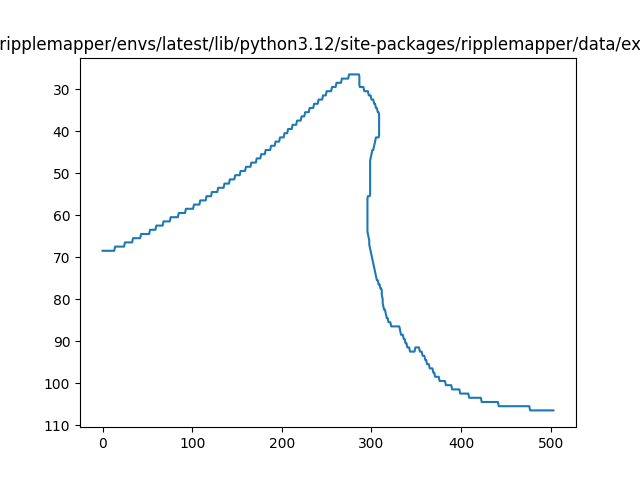
Since many of the methods for computing boundaries rely on contouring data, it is possible that the contours may have small “bumps” in them.
This happens when the contouring “jumps” from one parallel line to the next and back again, it looks like a small discontinuity when plotted.
These can sometimes be removed using ripplemapper.
We load our image into a RippleImage and then run add_boundary_contours to add boundary contours to the image.
import matplotlib.pyplot as plt

from ripplemapper.analyse import add_boundary_contours, remove_small_bumps
from ripplemapper.classes import RippleImage
from ripplemapper.data.example import example_data

ripple_img = RippleImage(example_data[-1])
add_boundary_contours(ripple_img, sigma=2)
Plotting the contour
ripple_img.contours[0].plot()
plt.show()
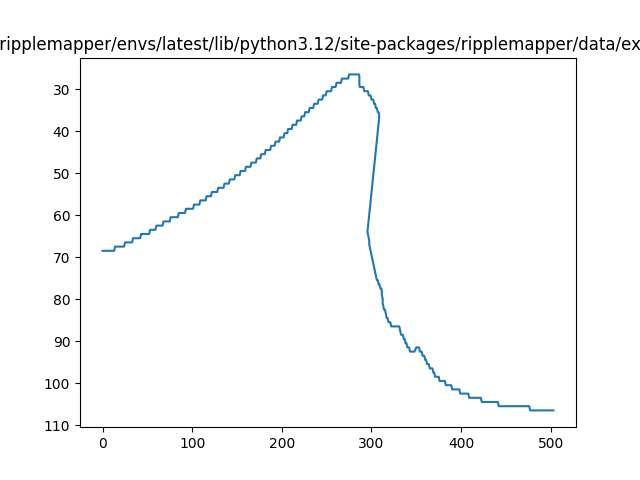
We can remove the small bumps by running remove_small_bumps.
remove_small_bumps(ripple_img.contours[0])
num removed (41,)

<ripplemapper.classes.RippleContour object at 0x7a839f44d3a0>
Plotting the now smoothed contour, this is not perfectly smooth but does have some of the abrupt discontoniuties removed.
ripple_img.contours[0].plot()
plt.show()
Total running time of the script: (0 minutes 0.115 seconds)